“I’m A Little Teapot“, also known as “The Teapot Song”, is a popular nursery rhyme. This song was first published in 1939 by George Sanders and Clarence Kelley who wrote the song.
The “I, IV, V” Chords are also known as primary chords. This is because in any song, these three primary chords are played more often than any other chords in that particular key.
For example, in the key of C Major scale - the I, IV, V chords, i.e. C Chord, F Chord, and G Chord, are played more often than four other chords (D, E, A, and B chords).
Let’s look at the Key of C, the I, IV, V chords of C Major scale are: C Chord, F Chord, and G Chord as the following:
C Major Scale (WS, WS, HS, WS, WS, WS)
C — I
D — ii
E — iii F — IV G — V
A — vi
B — vii
Let’s look at the Key of D, the I, IV, V chords of D Major scale are: D Chord, G Chord, and A Chord as the following:
D Major Scale (WS, WS, HS, WS, WS, Ws)
D — I
E — ii
F♯ — iii G — IV A — V
B — vi
C♯ — vii
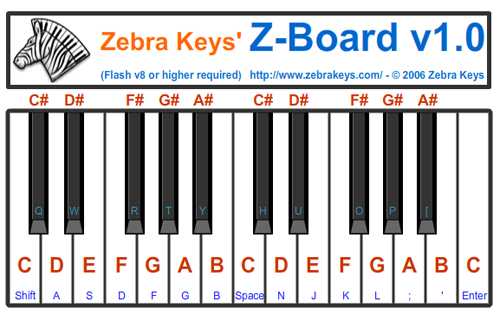
UseZebraKeys’ virtual piano below (if you don’t already own a piano)
to play these chords, and hear what they sound like - fun learning!!
Below is a list of the I, IV, V Chords in all 12 keys:
Key of A: A - D - E
Key of B♭: B♭ - E♭ - F
Key of B: B - E - F♯
Key of C: C - F - G
Key of D♭: D♭ - G♭ - A♭
Key of D: D - G - A
Key of E♭: E♭ - A♭ - B♭
Key of E: E - A - B
Key of F: F - B♭ - C
Key of F♯: F♯ - B - C♯
Key of G: G - C -D
Key of A♭: A♭ - D♭ - E♭
You can use the pattern of whole steps (WS) and half steps (HS)
to find any major scale in all 12 keys:
Root , WS , WS , HS , WS , WS , WS , HS
The whole steps are located between C/D, D/E, F/G, G/A, and A/B.
The half steps are located between E/F, and B/C.
Playing C Major: C , (Root) D , (C/D = WS) E , (D/E = WS) F , (E/F = HS) G , (F/G = WS) A , (G/A = WS) B, (A/B = WS) C , (B/C = HS)
You’ll learn how to play C Major with the right hand and left hand separately. Next, practice to play C Major scale with both hands together. Watch demo on Synthesia.
1 = Thumb
2 = Index Finger
3 = Middle Finger
4 = Ring Finger
5 = Pinky
Right hand fingering:
C, D, E, F, G, A, B, C
1 , 2 , 3 , 4 , 5 , 1 , 2 , 3
Left hand fingering:
C, D, E, F, G, A, B, C
5 , 4 , 3 , 2 , 1 , 3 , 2 , 1
Let’s look at the diagram of piano keyboard below: - WS = distance between any two keys with one (either black or white) key in between
- HS = distance between any two keys with no (either black or white) key in between them
The pattern for all of the major scales is: (Root) - WS - WS - HS - WS - WS - WS - HS (The keys of the piano keyboard in the illustration below have been spread out in order for you to easily see where the half steps and whole steps are located.)
There are 12 different keys on the piano keyboard, so there are 12 possible major scales. Let’s first look at a major scale that starts on C, called a C major scale. The C major scale is the easiest major scale to play since it is made up of only white keys:
Learn to play C Major Scale C Major: C,D,E,F,G,A,B,C,
C, D, E, F, G, A, B, C - (Root), WS, WS, HS, WS, WS, WS, HS
C (Root)
D (C to D = WS)
E (D to E = WS)
F (E to F = HS)
G (F to G = WS)
A (G to A = WS)
B (A to B = WS)
C (B to C = HS)
1 = Thumb
2 = Index Finger
3 = Middle Finger
4 = Ring Finger
5 = Pinky
Right hand fingering:
C, D, E, F, G, A, B, C
1, 2, 3, 1, 2, 3, 4, 5
Left hand fingering:
C, D, E, F, G, A, B, C
5, 4, 3, 2, 1, 3, 2, 1
Learn to play G Major Scale G Major: G,A,B,C,D,E,F#,G
The whole steps are located between G/A, A/B, C/D, D/E, and E/F#.
The half steps are located between B/C, and F#/G.
Apply this pattern of whole steps and half steps to find the major scale on all 12 keys:
Root, WS, WS, HS, WS, WS, WS, HS
G, (G/A = WS) A, (A/B = WS) B, (B/C = HS) C, (C/D = WS) D, (D/E = WS) E, (E/F# = WS) F#, (F#/G = HS) G
Playing G Major: G,A,B,C,D,E,F#,G
G , (Root)
A , (G to A = WS)
B , (A to B = WS)
C , (B to C = HS)
D , (C to D = WS)
E , (D to E = WS)
F#, (E to F# = WS)
G , (F# to G = HS)
1 = Thumb
2 = Index Finger
3 = Middle Finger
4 = Ring Finger
5 = Pinky
Right hand fingering:
G, A, B, C, D, E, F#, G
1, 2, 3, 1, 2, 3, 4, 5
Left hand fingering:
G, A, B, C, D, E, F#, G
5, 4, 3, 2, 1, 3, 2, 1
The whole steps are located between D/E, E/F#, G/A, A/B, and B/C#, and the half steps are located between F#/G, and C#/D. You can use this pattern of whole steps and half steps to find the major scale on all 12 keys:
Root, WS, WS, HS, WS, WS, WS, HS
Playing D Major: D,E,F#,G,A,B,C#,D
D , (Root)
E , (D to E = WS)
F# , (E to F# = WS)
G , (F# to G = HS)
A , (G to A = WS)
B, (A to B = WS)
C# , (B to C# = WS)
D, (C# to D = HS)
1 = Thumb
2 = Index Finger
3 = Middle Finger
4 = Ring Finger
5 = Pinky
Right hand fingering:
D, E, F#, G, A, B, C#, D
1, 2, 3, 1, 2, 3, 4, 5
Left hand fingering:
D, E, F#, G, A, B, C#, D
5, 4, 3, ,2, ,1, ,3, ,2, ,1
Learn to play A Major Scale A Major: A,B,C#,D,E,F#,G#,A
The whole steps are located between A/B, B/C#, D/E, E/F#, and F#/G#. The half steps are located between C#/D, and G#/A. You can use this pattern of whole steps and half steps to find the major scale on all 12 keys:
Root, WS, WS, HS, WS, WS, WS, HS
Playing A Major: A,B,C#,D,E,F#,G#,A
A , (Root)
B , (A to B = WS)
C# , (B to C# = WS)
D , (C# to D = HS)
E , (D to E = WS)
F#, (E to F# = WS)
G# , (F# to G# = WS)
A, (G# to A = HS)
You’ll learn how to play A Major with the right hand and left hand separately. Next, you’ll practice to play A Major scale with both hands together. Watch demo on Synthesia.
1 = Thumb
2 = Index Finger
3 = Middle Finger
4 = Ring Finger
5 = Pinky
Right hand fingering:
A,B,C#,D,E,F#,G#,A
1, 2, 3, 1, 2, 3, 4, 5
Left hand fingering:
A,B,C#,D,E,F#,G#,A
5, 4, 3, 2, 1, 3, 2, 1
The whole steps are located between E/F#, F#/G#, A/B, B/C#, and C#/D#. The half steps are located between G#/A, and D#/E. You can use this pattern of whole steps and half steps to find the major scale on all 12 keys:
Root, WS, WS, HS, WS, WS, WS, HS
Playing E Major Scale: E,F#,G#,A,B,C#,D#,E
E , (Root)
F# , (E to F# = WS)
G# , (F# to G# = WS)
A, (G# to A = HS)
B , (A to B = WS)
C#, (B to C# = WS)
D# , (C# to D# = WS)
E, (D# to E = HS)
You’ll learn how to play E Major with the right hand and left hand separately. Next, you’ll practice to play E Major scale with both hands together. Watch demo on Synthesia.
1 = Thumb
2 = Index Finger
3 = Middle Finger
4 = Ring Finger
5 = Pinky
Right hand fingering:
E,F#,G#,A,B,C#,D#,E
1, 2, 3, 1, 2, 3, 4, 5
Left hand fingering:
E,F#,G#,A,B,C#,D#,E
5, 4, 3, ,2,1,3, 2,1
Learn to play B Major Scale B Major: B,C#,D#,E, F#, G#, A#, B
The whole steps are located between B/C#, C#/D#, E/F#, F#/G#, and G#/A#. The half steps are located between D#/E, and A#/B. You can use this pattern of whole steps and half steps to find the major scale on all 12 keys:
Root, WS, WS, HS, WS, WS, WS, HS
Playing B Major: B,C#,D#,E, F#, G#, A#, B
B , (Root)
C# , (B to C# = WS)
D# , (C# to D# = WS)
E, (D# to E = HS)
F# , (E to F# = WS)
G#, (F# to G# = WS)
A# , (G# to A# = WS)
B, (A# to B = HS)
You’ll learn how to play B Major with the right hand and left hand separately. Next, you’ll practice to play B Major scale with both hands together. Watch demo on Synthesia.
1 = Thumb
2 = Index Finger
3 = Middle Finger
4 = Ring Finger
5 = Pinky
Right hand fingering:
B,C#,D#,E,F#,G#,A#, B
1, 2, 3, 1, 2, 3, 4, 5
Left hand fingering:
B,C#,D#,E,F#,G#,A#, B
4, 3, ,2, 1, 4, 3, 2,1
Learn to play F# | Gb Major Scale F# or Gb Major: F#,G#,A#,B,C#,D#,E#,F#
The whole steps are located between F#/G#, D#/A#, B/C#, C#?D#, and D#/E#. The half steps are located between A#/B, and E#/F#. You can use this pattern of whole steps and half steps to find the major scale on all 12 keys:
Root, WS, WS, HS, WS, WS, WS, HS
Playing F# | Gb Major: F#,G#,A#,B,C#,Eb,F,F#
F# , (Root)
G# , (F# to G# = WS)
A# , (G# to A# = WS)
B , (A# to B = HS)
C# , (B to C# = WS)
D# , (C# to D# = WS)
F, (D# to F = WS)
F# , (F to F# = HS)
You’ll learn how to play F# | Gb Major with the right hand and left hand separately. Next, you’ll practice to play F# | Gb Major scale with both hands together. Watch demo on Synthesia.
1 = Thumb
2 = Index Finger
3 = Middle Finger
4 = Ring Finger
5 = Pinky
Right hand fingering:
F#,G#,A#,B,C#,D#,E#,F#
2, 3, 4, 1, 2, 3, 1, 2
Left hand fingering:
F#,G#,A#,B,C#,D#,E#,F#
4, 3, 2, 1, 3, 2, 1, 4
Learn to play F Major Scale F Major: F,G,A,Bb,C,D,E,F
The whole steps are located between F/G, G/A, Bb/C, C/D, and D/E. The half steps are located between A/Bb, and E/F. You can use this pattern of whole steps and half steps to find the major scale on all 12 keys:
Root, WS, WS, HS, WS, WS, WS, HS
Playing F Major scale: F,G,A,Bb,C,D,E,F
F , (Root)
G , (F to G = WS)
A , (G to A = WS)
Bb, (A to Bb = HS)
C , (Bb to C = WS)
D, (C to D = WS)
E , (D to E = WS)
F, (E to F = HS)
You’ll learn how to play F Major with the right hand and left hand separately. Next, you’ll practice to play F Major scale with both hands together. Watch demo on Synthesia.
1 = Thumb
2 = Index Finger
3 = Middle Finger
4 = Ring Finger
5 = Pinky
Right hand fingering:
F,G,A,Bb,C,D,E,F
1, 2, 3, 4, 1, 2, 3, 4
Left hand fingering:
F,G,A,Bb,C,D,E,F
5, 4, 3 ,2,1,3, 2,1
Learn to play Bb | A# Major Scale Bb Major scale: Bb, C, D, Eb, F, G, A, Bb
The whole steps are located between Bb/C, C/D, Eb/F, F/G, and G/A. The half steps are located between D/Eb, and A/Bb. You can use this pattern of whole steps and half steps to find the major scale on all 12 keys:
Root, WS, WS, HS, WS, WS, WS, HS
Playing Bb Major: Bb, C, D, Eb, F, G, A, Bb
Bb , (Root)
C , (Bb to C = WS)
D , (C to D = WS)
Eb , (D to Eb = HS)
F, (Eb to F = WS)
G, (F to G = WS)
A , (G to A = WS)
Bb, (A to Bb = HS)
You’ll learn how to play Bb Major with the right hand and left hand separately. Next, you’ll practice to play Bb Major scale with both hands together. Watch demo on Synthesia.
1 = Thumb
2 = Index Finger
3 = Middle Finger
4 = Ring Finger
5 = Pinky
Right hand fingering:
Bb, C, D, Eb, F, G, A, Bb
4. 1. 2. 3. 1. 2. 3. 4
Left hand fingering:
Bb, C, D, Eb, F, G, A, Bb
3, 2, 1, 4, 3, 2, 1, 3
Learn to play Eb | D# Major Scale Eb Major: Eb, F, G, Ab, Bb, C, D, Eb
The whole steps are located between Eb/F, F/G, Ab/Bb, Bb/C, and C/D. The half steps are located between G/Ab, and D/Eb. You can use this pattern of whole steps and half steps to find the major scale on all 12 keys:
Root, WS, WS, HS, WS, WS, WS, HS
Playing Eb Major: Eb, F, G, Ab, Bb, C, D, Eb
Eb , (Root)
F , (Eb to F= WS)
G , (F to G = WS)
Ab , (G to Ab = HS)
Bb, (Ab to Bb = WS)
C, (Bb to C = WS)
D , (C to D = WS)
Eb, (D to Eb = HS)
You’ll learn how to play Eb Major with the right hand and left hand separately. Next, you’ll practice to play Eb Major scale with both hands together. Watch demo on Synthesia.
1 = Thumb
2 = Index Finger
3 = Middle Finger
4 = Ring Finger
5 = Pinky
Right hand fingering:
Eb, F, G, Ab, Bb, C, D, Eb
3, 1, 2, 3, 4, 1, 2, 3
Left hand fingering:
Eb, F, G, Ab, Bb, C, D, Eb
3, 2, 1, 4, 3, 2, 1, 3
Learn to play Ab | G# Major Scale Ab Major scale: Ab, Bb, C, Db, Eb, F, G, Ab
The whole steps are located between Ab/Bb, Bb/C, Db/Eb, Eb/F, and F/G. The half steps are located between C/Db, and G/Ab. You can use this pattern of whole steps and half steps to find the major scale on all 12 keys:
Root, WS, WS, HS, WS, WS, WS, HS
Playing Ab Major: Ab, Bb, C, Db, Eb, F, G, Ab
Ab , (Root)
Bb , (Ab to Bb = WS)
C , (Bb to C = WS)
Db , (C to Db = HS)
Eb, (Db to Eb = WS)
F, (Eb to F = WS)
G , (F to G = WS)
Ab, (G to Ab = HS)
You’ll learn how to play Ab Major with the right hand and left hand separately. Next, you’ll practice to play Ab Major scale with both hands together. Watch demo on Synthesia.
1 = Thumb
2 = Index Finger
3 = Middle Finger
4 = Ring Finger
5 = Pinky
Right hand fingering:
Ab, Bb, C, Db, Eb, F, G, Ab
3, 4, 1, 2, 3, 1, 2, 3
Left hand fingering:
Ab, Bb, C, Db, Eb, F, G, Ab
3, 2, 1, 4, 3, 2, 1, 3
Learn to play Db | C# Major Scale Db or C# Major: Db, Eb, F, Gb, Ab, Bb, C, Db
The whole steps are located between Db/Eb, Eb/F, Gb/Ab, Ab/Bb, and Bb/C. The half steps are located between F/Gb, and C/Db. You can use this pattern of whole steps and half steps to find the major scale on all 12 keys:
Root, WS, WS, HS, WS, WS, WS, HS
Playing Db Major: Db, Eb, F, Gb, Ab, Bb, C, Db
Db , (Root)
Eb , (Db to Eb = WS)
F , (Eb to F = WS)
Gb , (F to Gb = HS)
Ab, (Gb to Ab = WS)
Bb, (Ab to Bb = WS)
C , (Bb to C = WS)
Db, (C to Db = HS)
You’ll learn how to play Db Major with the right hand and left hand separately. Next, you’ll practice to play Db Major scale with both hands together. Watch demo on Synthesia.
1 = Thumb
2 = Index Finger
3 = Middle Finger
4 = Ring Finger
5 = Pinky
Right hand fingering:
Db, Eb, F, Gb, Ab, Bb, C, Db
2, 3, 1, 2, 3, 4, 1, 2
Left hand fingering:
Db, Eb, F, Gb, Ab, Bb, C, Db
3, 2, 1, 4, 3, 2, 1, 3
Practice playing the above major scales on your piano, or
use interactive virtual piano keyboard below.
Click to browse piano keyboards here if you don’t already own one.
Learn how to make transitions between different chords can make them sound smoother. We have learned how to play chord progressions in the last lessons, and now we will learn how to play Chord Inversions.
Besides playing a chord in its own root position, you can also play it in “1st Inversion” and “2nd Inversion” chord positions.
Root Position Chords
You have learned and played songs using chords in their root position (see beginner “Learn Song” section). All this means is that when you played a C major chord (C - E - G) - C is the first (lowest) note in the chord.
C Major Chord in Root Position: C - E - G
1st Inversion Chords
To play the C major chord in 1st inversion, you need to move the first note (lowest note) of the C major chord, which is “C” up one octave higher. So, you will play: E - G - C.
C Major Chord in 1st Inversion: E - G - C
2nd Inversion Chords
To play the C major chord in its 2nd inversion, you need to move the first note (C), and second note (E) up one octave higher.
C Major Chord in 2nd Inversion: G - C - E
Watch the demo below playing “Twinkle, Twinkle Little Star”. Notice that the three chords (C chord, F chord, and G chords) in this song are played in their root position:
Playing a Song Using Inversions
In the song, “Twinkle Twinkle Little Star” below, we play the F chord and G chords in their different inversion:
C major chord in root position: C - E - G F major chord in 2nd inversion: C - F - A G major chord in 1st inversion: B - D - G
(Note that it is easier to play these chords once you get use to the different chord positions, since you do not have to move your left hand around that much. Also, it sounds smoother because the notes are closer to each other when transitioning from one chord to the next.)
Now, play the chords below in different positions on your piano to hear how they sound like. You can use Virtual Z-Board below if you don’t already own a piano:
1) Use mouse to click directly on any key(note highlighted in RED), or
2) Use finger to press on any corresponding button (key highlighted in BLUE) on your computer keyboard to play that note (this feature is used when playing chords - you have to first click on the virtual piano once to activate this feature) e.g. Press “Shift” to play note “C”, press letter “S” to play note “E”, and letter “F” for note “G”, and so on. To play C Major Chord (C - E - G): Use fingers to press “Shift”, “S” and “F” at the same time.
C Chord
F Chord
G Chord
Root
C - E - G
F - A - C
G - B - D
1st Inversion
E - G - C
A - C - F
B - D - G
2nd Inversion
G - C - E
C - F - A
D - G - B
Chord Inversions can help chord progressions sound smoother.
Try using inversions with other songs as well!
Now, let’s watch demo of “Twinkle, Twinkle Litter Star”
using chord inversions. Play this on your piano:
Learn piano - Time Signatures - Learn how to read piano music.
A time signature tells you how a particular piece of music is played. A time measure consists of two numbers written as a fraction (i.e. 4/4). The top number tells you how many counts (beats) are in each measure, and the bottom number tells you what kind of a note (e.g. a whole note, a half note, etc.) receives one count.
4/4 Time - 4 counts per measure
Time signature of 4/4 - the “4″ on the top tells you that there are four beats in each measure, and the “4″ on the bottom tells you that a “quarter note” receives one count (or beat).
3/4 Time - 3 counts per measure
Time signature of 3/4 - the “3″ on the top tells you that there are three beats in each measure, and the “4″ on the bottom tells you that a “quarter note” receives one count.
2/4 Time - 2 counts per measure
Time signature of 2/4 - the “2″ on the top tells you that there are three beats in each measure, and the “4″ on the bottom tells you that a “quarter note” receives one count.
What is this Circle of Fifths? Circle of Fifths (5ths) is also known as the Circle of Keys. It is a circle that has all 12 keys of the piano written on it, and it is useful for improvising and writing music.
PROPERTIES OF CIRCLE OF THE FIFTHS
There are many interesting properties for the Circle of Fifths. Let’s take a look at some of them.
The Circle of Fifths helps us identify the three primary chords in any key.
In the “Chords” section of the beginners piano, you learned about sets of “Three Primary Chords” that could be used to play 1000’s of songs. You also learned that there is a set of three primary chords in each of the 12 keys.
Let’s review - in the Key of C, the three primary chords are C, F, and G. Well, let’s look at the Circle of Fifths. If you look at C, it is surrounded by F and G! So, in order to find the three primary chords in any key, just find that key in the Circle of Fifths. The two letters that are surrounded that particular key will complete the three primary chords in that key.
In the key of A, the three primary chords are A, D, and E, and in the key of Bb, the three primary chords are Bb, Eb, and F, and so on.
The keys of the Circle of Fifths moves up by a perfect 5th note in the clockwise direction
Let’s take a look at C. If you move clockwise, the next key is G. G is a perfect 5th above C. Every single move clockwise on the Circle of Fifths moves the key up by a perfect 5th.
You should now be familiar with the Circle of Fifths. One interesting property of the Circle of Fifths is that the primary chords appear next to each other on the Circle of Fifths. You will learn more about the Circle of Fifths in lessons to come.
Our free online piano lessons come with animation demo where you can Watch, Hear & Learn.
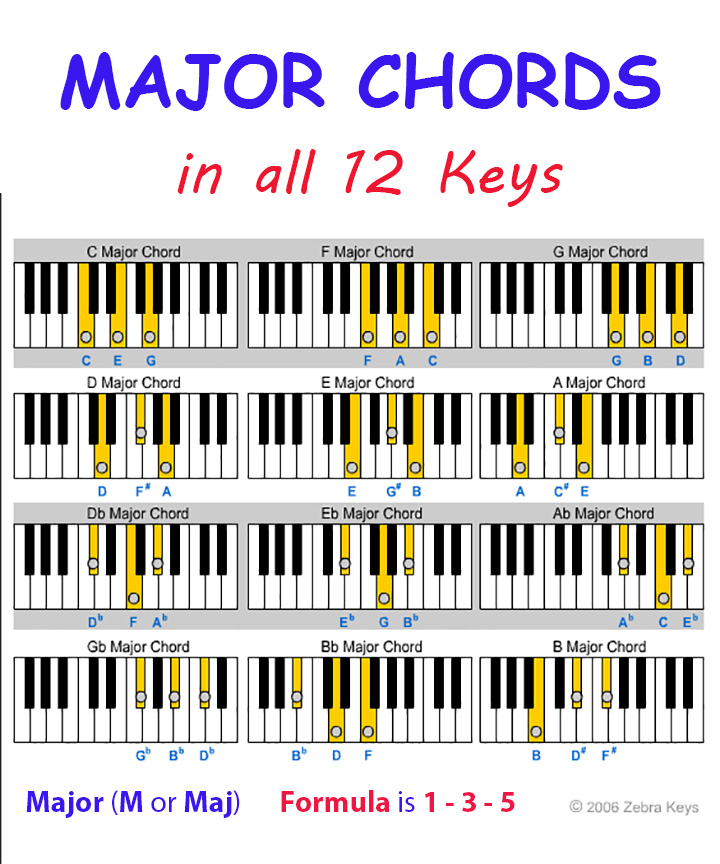
In this lesson, you will learn about major chords. Major chords are basically three notes that are played together or nearly together. You can recognize a major chord when you hear it because it sounds happy. Major chords can be used to play literally 1000’s of songs ranging from classical tunes to today’s most popular hits.
Major Chord in all 12 Keys are –
C Major: C - E - G
D♭ Major: D♭ - F - A♭
D Major: D - F♯ - A
E♭ Major: E♭ - G - B♭
E Major: E - G♯ - B
F Major: F — A - C
G♭ Major: G♭ - B♭ - D♭
G Major: G - B - D
A♭ Major; A♭ - C - E♭
A Major: A - C♯ - E
B♭ Major: B♭ - D - F
B Major: B - D♯ - F♯
You can download Major Chord Chart, and access Free interactive Chords Chart by written by Colm Mac Cárthaigh to find any chords of your desire.
Our free online piano lessons come with animation demos where you can Watch, Hear & Learn.